Localization
The kit ships two languages: English (en) and Indonesian (id). Every widget reads its strings from PaymentLocalizations.
Register the delegate
Section titled “Register the delegate”MaterialApp( localizationsDelegates: const [ PaymentLocalizations.delegate, GlobalMaterialLocalizations.delegate, GlobalWidgetsLocalizations.delegate, GlobalCupertinoLocalizations.delegate, ], supportedLocales: const [Locale('id'), Locale('en')],);The Global… delegates come from flutter_localizations (add it to your pubspec.yaml). Without PaymentLocalizations.delegate, widgets still pick a language from the ambient locale: Indonesian for id, English otherwise. PaymentLocalizations.supportedLanguages is ['en', 'id'].
Add a language
Section titled “Add a language”Every kit string is an overridable instance getter or method on
PaymentLocalizations, including payment messages, settings actions, sheet
labels and transaction status labels. Subclass it and register your own
LocalizationsDelegate<PaymentLocalizations> for the added language. The public
constructor takes a language code, not a Locale, and is not const.
This complete example translates Save and the sheet close action into German and
formats chart numbers the German way, so the bar chart shows 1.234,5 for
1234.5:
import 'package:flutter/foundation.dart';import 'package:flutter/material.dart';import 'package:flutter_localizations/flutter_localizations.dart';import 'package:rakit_ui/rakit_ui.dart';
class GermanPaymentLocalizations extends PaymentLocalizations {  GermanPaymentLocalizations() : super('de');
  @override  String get save => 'Speichern';
  @override  String get closeSheet => 'Schließen';
  // German groups with "." and uses "," for decimals: 1234.5 -> 1.234,5.  @override  String formatNumber(num value, {bool grouping = true}) => super      .formatNumber(value, grouping: grouping)      .replaceAll(',', '#')      .replaceAll('.', ',')      .replaceAll('#', '.');}
class GermanPaymentDelegate extends LocalizationsDelegate<PaymentLocalizations> {  const GermanPaymentDelegate();
  @override  bool isSupported(Locale locale) => locale.languageCode == 'de';
  @override  Future<PaymentLocalizations> load(Locale locale) =>      SynchronousFuture(GermanPaymentLocalizations());
  @override  bool shouldReload(GermanPaymentDelegate old) => false;}
void main() {  runApp(    MaterialApp(      locale: const Locale('de'),      supportedLocales: const [Locale('de'), Locale('en'), Locale('id')],      localizationsDelegates: const [        GermanPaymentDelegate(),        PaymentLocalizations.delegate,        GlobalMaterialLocalizations.delegate,        GlobalWidgetsLocalizations.delegate,        GlobalCupertinoLocalizations.delegate,      ],      home: Scaffold(        body: PaymentSettingsView(          title: 'Einstellungen',          onSave: () async {},          child: Column(            children: [              PaymentSheetHeader(title: 'Details', onClose: () {}),              const SizedBox(                height: 240,                child: PaymentBarChart(                  unit: PaymentChartUnit.number,                  points: [                    ChartPoint(label: 'Jan', measure: 1234.5),                    ChartPoint(label: 'Feb', measure: 980),                  ],                ),              ),            ],          ),        ),      ),    ),  );}
Add the Flutter SDK’s flutter_localizations dependency to your host app for
the Global… delegates. These translate Flutter’s own controls; your subclass
translates Rakit strings. PaymentLocalizations.of(context) returns the instance
loaded by your delegate, so existing kit widgets use your overrides automatically.
Register the host delegate before the built-in delegate when both support the
same language: Flutter uses the first supported delegate for each localization type.
With super('de'), any getter or method you do not override keeps its English
default. The same applies to other language codes besides id. Override
parameterized methods too, such as timeRemaining(String time) and
paymentStatusShort(PaymentStatus? status), to translate those messages.
Override formatNumber(num value, {bool grouping = true}) for chart numbers and percentages, including axis labels, tooltips and spoken values. The default rounds to at most one decimal digit and omits a trailing zero; percentages pass grouping: false. Return only the digits and separators, since charts add the percent unit. For example, a German override should return 1.234,5 for 1234.5.
Money and date formatters retain their built-in English conventions for unknown
languages unless you override them as well. Host-provided titles, labels and
content remain the host’s responsibility.
The built-in delegate still supports only en and id; add new locales to
MaterialApp.supportedLocales and your delegate’s isSupported.
Without a matching kit delegate, the ambient locale selects Indonesian for
id and English otherwise.
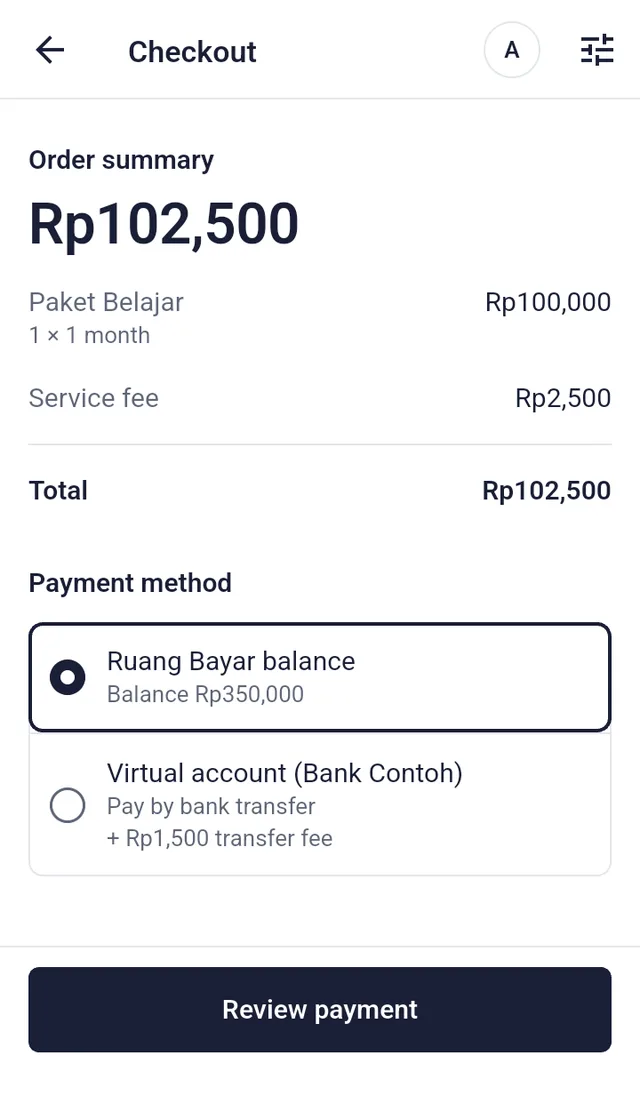
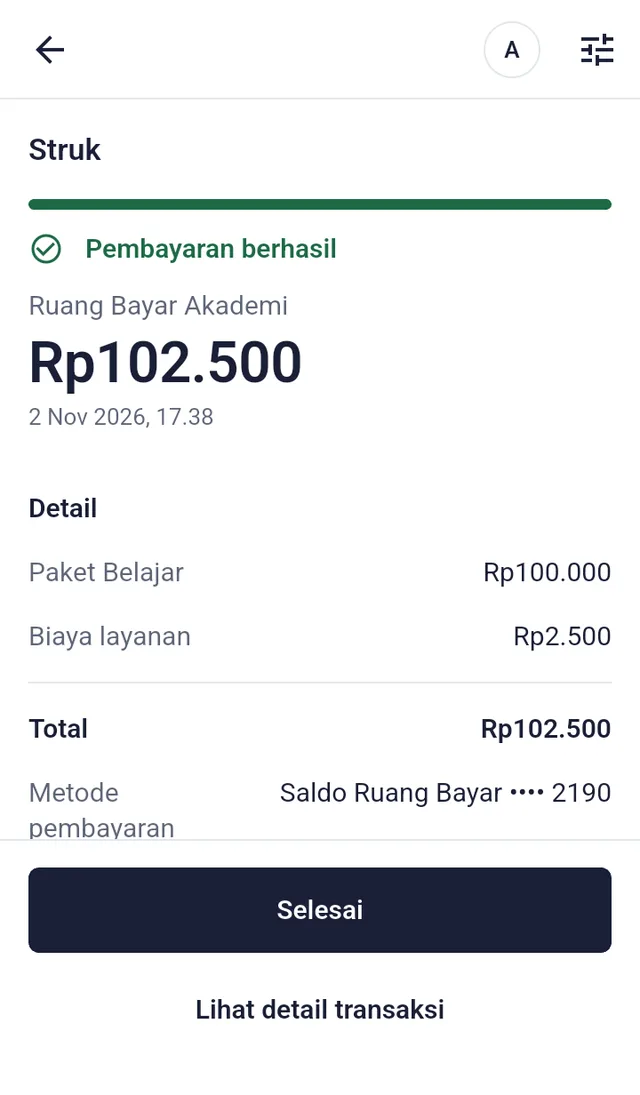
Amounts follow the language too: id groups with . and uses , for decimals, en does the opposite. PaymentLocalizations.of(context).moneyFormat is the active MoneyFormat. Money covers the type, formatting, currencies and strict parsing.
PaymentLocalizations.formatDateTime prints “30 Oct 2026, 14:05” in English and “30 Okt 2026, 14.05” in Indonesian, in the device time zone.
PaymentLocalizations
class PaymentLocalizations · lib/src/foundation/payment_localizations.dart
Overridable strings and formatters for every kit component.
Defaults support English (en) and Indonesian (id); other languages use English. To add a language, subclass this class and register a host LocalizationsDelegate<PaymentLocalizations> that returns the subclass. Override any string getter or method; unmodified members keep their defaults.
Add PaymentLocalizations.delegate to localizationsDelegates. Without it, widgets still pick a language from the ambient locale.
| Parameter | Type | Default | Description |
|---|---|---|---|
languageCoderequiredpositional | String | — | — |
dateInputPattern: | String | 'DD/MM/YYYY' | Typed date hint, DD/MM/YYYY in both locales (Q12). DD, MM and YYYY each occur once with one repeated /, . or - separator. Override app-wide with a host LocalizationsDelegate<PaymentLocalizations> returning PaymentLocalizations(code, dateInputPattern: 'MM/DD/YYYY'). Applies app-wide; there is no per-field override. |
See also
Section titled “See also”- Money for amounts and parsing.
- Accessibility for spoken amounts and labels.
Built-in translations support en and id. Use the formatting methods below for dates and amounts.
| You are showing… | Use |
|---|---|
| A calendar date | formatDate |
| An instant | formatDateTime |
| An amount | moneyFormat |
| The kit’s built-in words | PaymentLocalizations |
Do: register the existing localization delegates above. Don’t: hardcode translated strings in a widget. See Money and dates for calendar formatting and typed-date pattern overrides.
Field foundation
Section titled “Field foundation”Field strings include invalid-date, calendar, optional, character counter and currency labels. Register GlobalMaterialLocalizations.delegate for Indonesian Material calendar labels.