Currency field
PaymentCurrencyField lets people type an amount, for a top-up or a transfer. It parses strictly for the current locale and reports the result on every change; it never guesses what an unclear amount means.
Enable your confirm action only for a valid result.
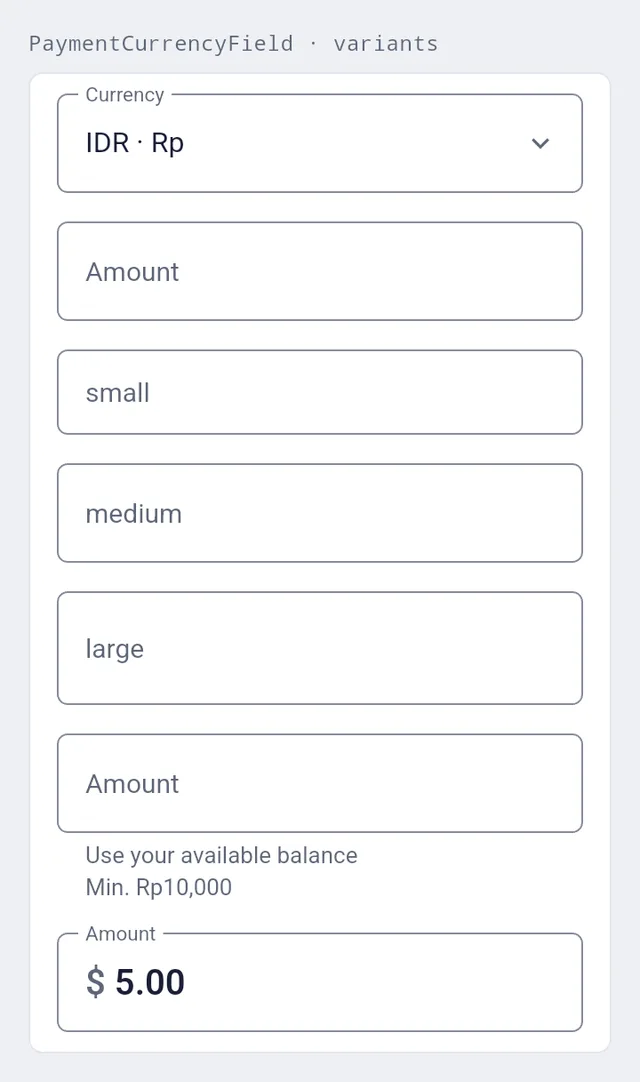
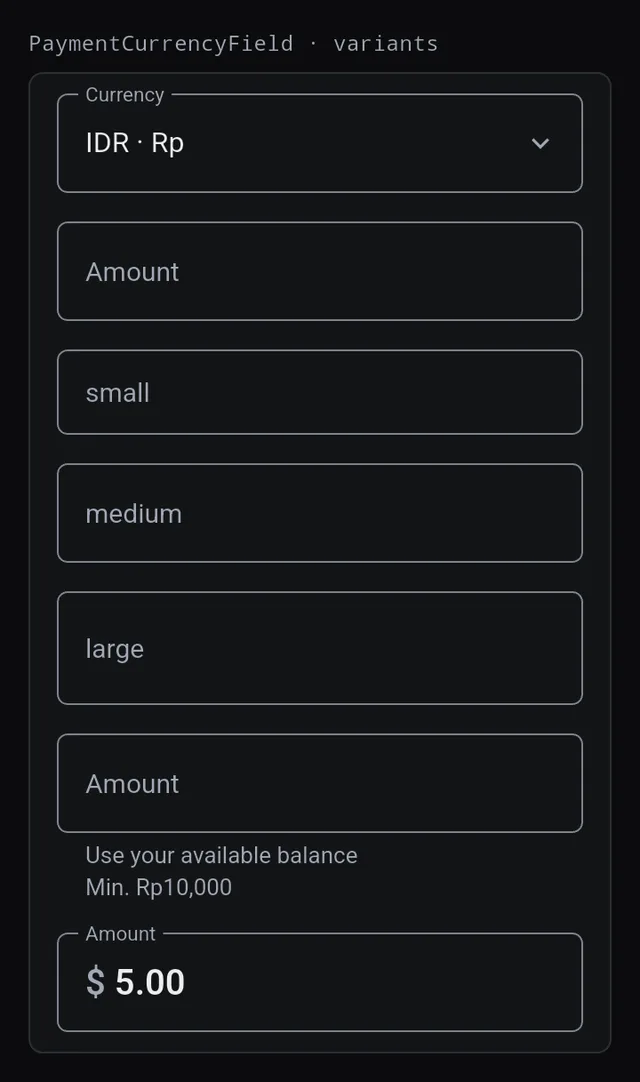
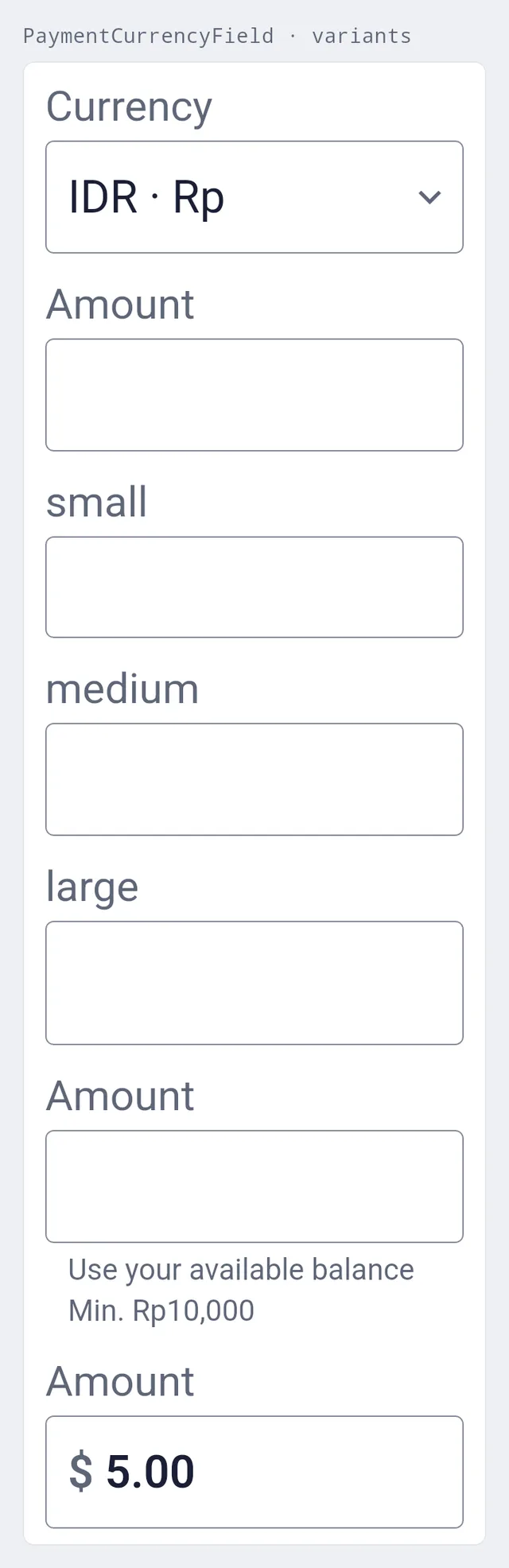
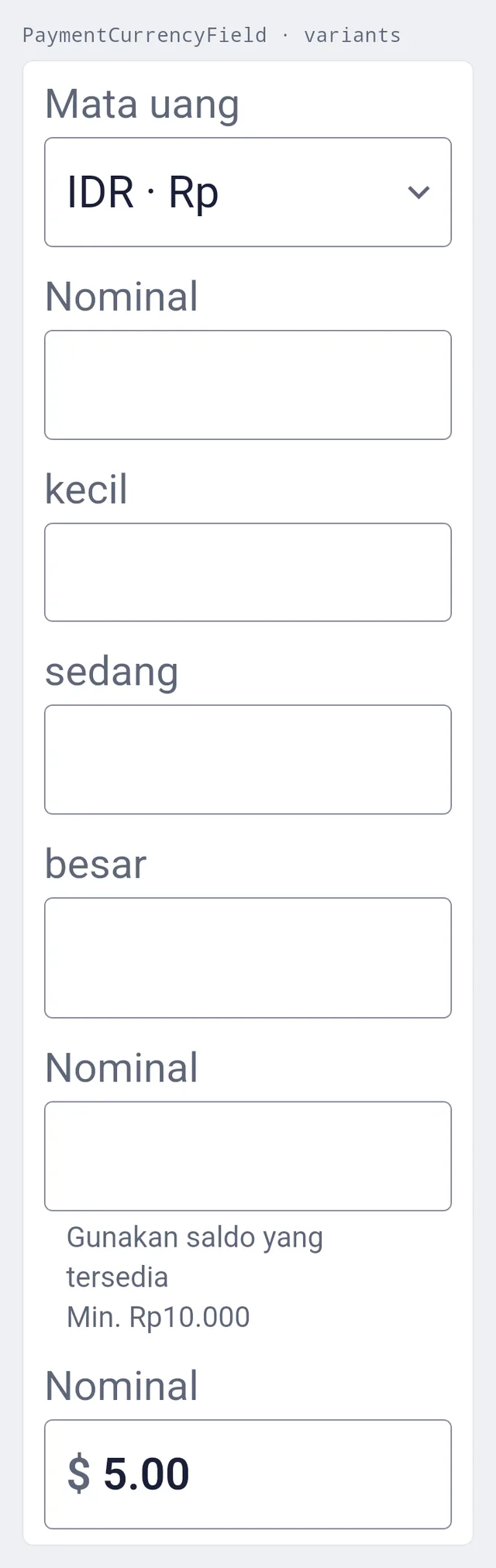
PaymentCurrencyField( currency: 'IDR', size: size, label: size.name, onChanged: (_) {}, );Variants
Section titled “Variants”Variants: single currency, allowlisted currency switch.
Default
Section titled “Default”The field shows the label “Amount” (or your label), the currency symbol as a prefix, and the entered amount in the 20 px amount style with tabular figures. With a minimum or maximum, a helper line shows the limits, for example “Min. Rp10,000 · Max. Rp5,000,000” in English. initialText fills the field when it first appears.
Errors
Section titled “Errors”Every change is parsed, but the error text appears only after the field loses focus with text in it, after the keyboard’s done action, or when you set showErrors: true, for example after a submit attempt. People are not told they are wrong while they are still typing.
AmountIssue |
When | Message (English) |
|---|---|---|
empty |
Nothing entered | Enter an amount. |
invalidFormat |
Letters or misplaced separators | Use digits only, for example 150000. |
ambiguous |
Text that could be read two ways, such as 100,000 for IDR in Indonesian |
This format can be read two ways. Remove separators and try again. |
negative |
A minus sign | Amount can’t be negative. |
zero |
Zero | Amount must be more than 0. |
belowMinimum |
Under minimum |
Minimum amount is Rp10,000. |
aboveMaximum |
Over maximum |
Maximum amount is Rp5,000,000. |
Parsing
Section titled “Parsing”The currency symbol or code, spaces and correctly placed group separators are accepted, so pasted amounts work. Separators follow the locale (see Money). Currencies without minor units, such as IDR, reject a decimal part as ambiguous rather than reading it as a group separator. The keyboard offers a decimal key only when the currency has minor units.
Behavior, states and migration
Section titled “Behavior, states and migration”The description appears above limits. Size keeps the amountLarge style: small subtracts 8 dp from today’s default input padding, medium keeps it, large adds 8 dp; even small stays at least 48 dp. Helpers and errors can add height.
padFractionDigits: on blur or submit, valid USD 5 becomes 5.00 (5,00 in Indonesian); IDR and invalid entries stay unchanged. Formatting emits no onChanged callback. Supply a currencies allowlist to offer currency selection, and handle parse issues through AmountParseResult.
Migration: AmountInput is a deprecated typedef. Rename the constructor to PaymentCurrencyField; existing arguments keep compiling.
The tested fixture with description and minimum helper measures small 92, medium 100 and large 108 dp at 1×; helper content contributes to these totals.
Host errorText overrides parse issues; hiddenElements keeps hidden subtext spoken. Errors use an icon and danger edge through the shared field treatment.
Field foundation
Section titled “Field foundation”PaymentCurrencyField.currencies is a host allowlist. Two or more currencies show a select above the amount. onCurrencyChanged reports the choice; the host passes the currency back and receives a reparsed amount after the frame.
Which variant when
Section titled “Which variant when”| Situation | Variant / composition | Payment example |
|---|---|---|
| Flexible top-up | single currency | Keep currency fixed unless the host explicitly allows switching. |
Use Text field for non-monetary numbers.
States
Section titled “States”Use AmountParseResult to distinguish valid input from a parse issue. Do not replace incomplete or invalid input with a guessed amount.
Layout. The entered amount keeps the 20 px amount style on the input’s 24 dp line, so the field is 48, 56 or 64 dp like a text field of the same size, at every text scale. The amount follows text scaling up to 1.6×.
Do and don’t
Section titled “Do and don’t”Do: Keep currency fixed unless the host explicitly allows switching.
Don’t: Convert an invalid parse to zero and enable Pay.
Content guidelines
Section titled “Content guidelines”- Keep the default label unless the amount has a specific role, such as “Top-up amount”.
- Always pass the limits you enforce, so people see them before they type.
- Do not format or rewrite what people type; show the formatted amount elsewhere, for example in the summary.
Accessibility
Section titled “Accessibility”- The entered amount follows text scaling up to 1.6×, like other large amounts.
- Error text is shown under the field in the danger tone and wraps up to three lines.
Customization
Section titled “Customization”The amount box follows the field-family PaymentFieldTheme: fill, resting outline and corners. The entered amount keeps the amount type role; themed input typography changes only its line height, with the default input line as its minimum to keep digits visible. A smaller input font can therefore make text fields shorter than currency fields. See Text field customization.
PaymentCurrencyField
class PaymentCurrencyField extends StatefulWidget · lib/src/payment/checkout.dart
Free-form amount entry with strict, locale-aware parsing.
Every change reports an AmountParseResult; hosts enable confirmation only for valid results. Errors appear after the field loses focus, after submit, or when showErrors is set.
| Parameter | Type | Default | Description |
|---|---|---|---|
currency:required | String | — | Currency code for parsing and formatting. |
onChanged:required | ValueChanged<AmountParseResult> | — | Reports every parse result. |
currencies: | List<String> | const [] | Host allowlist; two or more show a selector above the amount. |
onCurrencyChanged: | ValueChanged<String>? | — | Reports currency selection; the host passes the new currency back. |
minimum: | Money? | — | Optional lower bound. |
maximum: | Money? | — | Optional upper bound. |
initialText: | String? | — | Initial formatted input. |
label: | String? | — | Persistent field label. |
showErrors: | bool | false | Whether parse errors are visible before interaction. |
description: | String? | — | Helper text above the host's limits. |
size: | PaymentSize | PaymentSize.medium | Medium retains the default height; small is 8 dp shorter, large 8 taller. |
padFractionDigits: | bool | false | Pads missing minor digits on blur/submit without reporting a new value. |
errorText: | String? | — | Host error shown instead of a parse issue. |
hiddenElements: | Set<PaymentFieldPart> | const {} | Hidden field parts remain spoken. |
AmountParseResult
class AmountParseResult · lib/src/foundation/money.dart
Outcome of parsing and validating an amount. Exactly one of money or issue is set.
AmountParseResult.value(…)
| Parameter | Type | Default | Description |
|---|---|---|---|
moneyrequiredpositional | Money? | — | — |
AmountParseResult.issue(…)
| Parameter | Type | Default | Description |
|---|---|---|---|
issuerequiredpositional | AmountIssue? | — | — |
AmountIssue
enum AmountIssue · lib/src/foundation/money.dart
| Value | Description |
|---|---|
empty | — |
invalidFormat | — |
ambiguous | — |
negative | — |
zero | — |
belowMinimum | — |
aboveMaximum | — |
AmountInput
typedef AmountInput = PaymentCurrencyField · lib/src/payment/checkout.dart
Deprecated. Use PaymentCurrencyField.
Deprecated alias of PaymentCurrencyField.