KYC capture and upload recovery
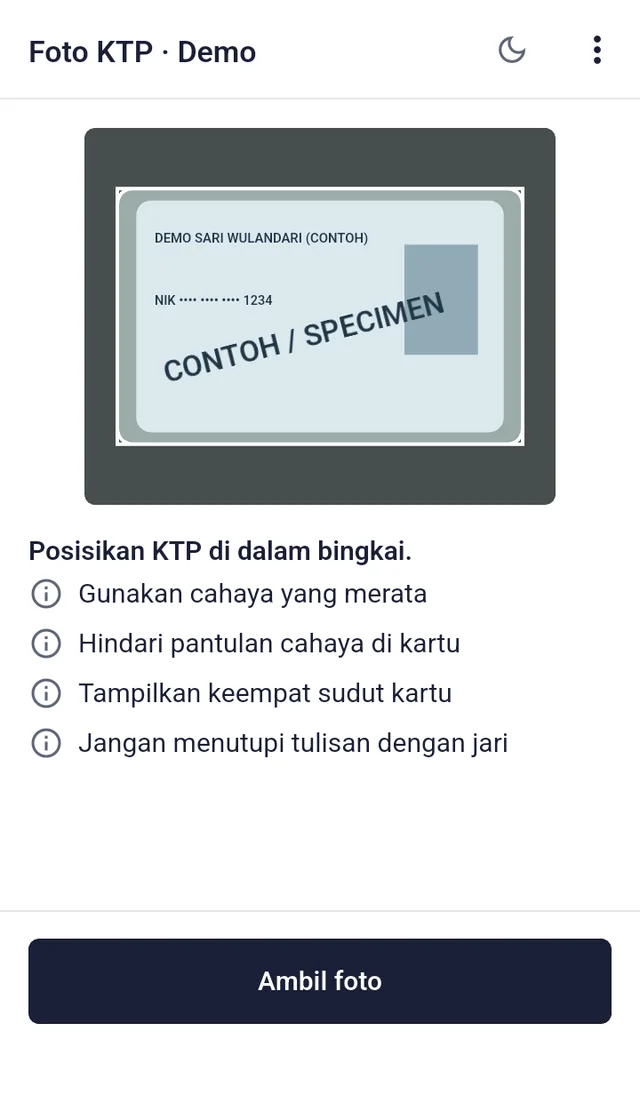
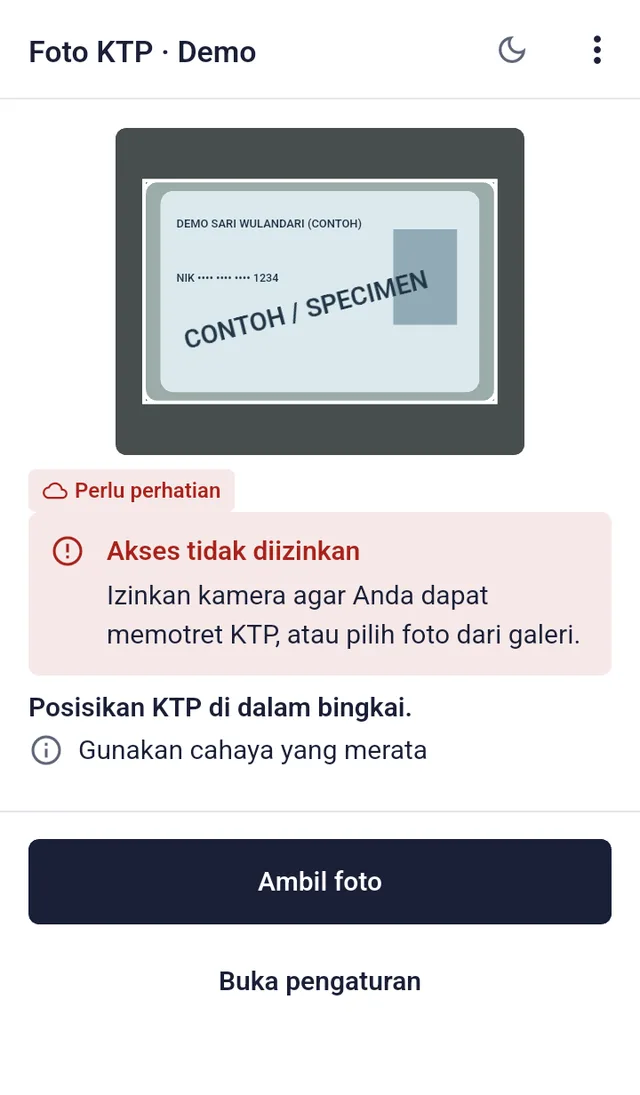
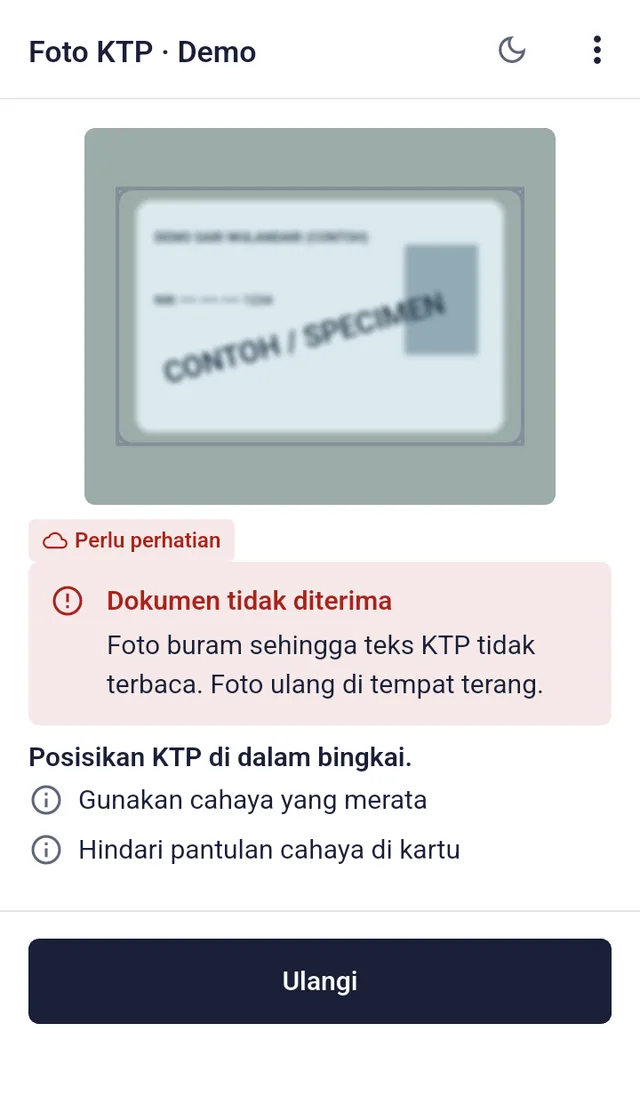
Guide the person to photograph their ID card, preview the photo and upload it. A denied camera explains why and offers settings. A blurry photo asks for a retake; an interrupted upload retries the same photo. A finished upload is not a verdict: only the host’s verification status says whether the identity is verified.
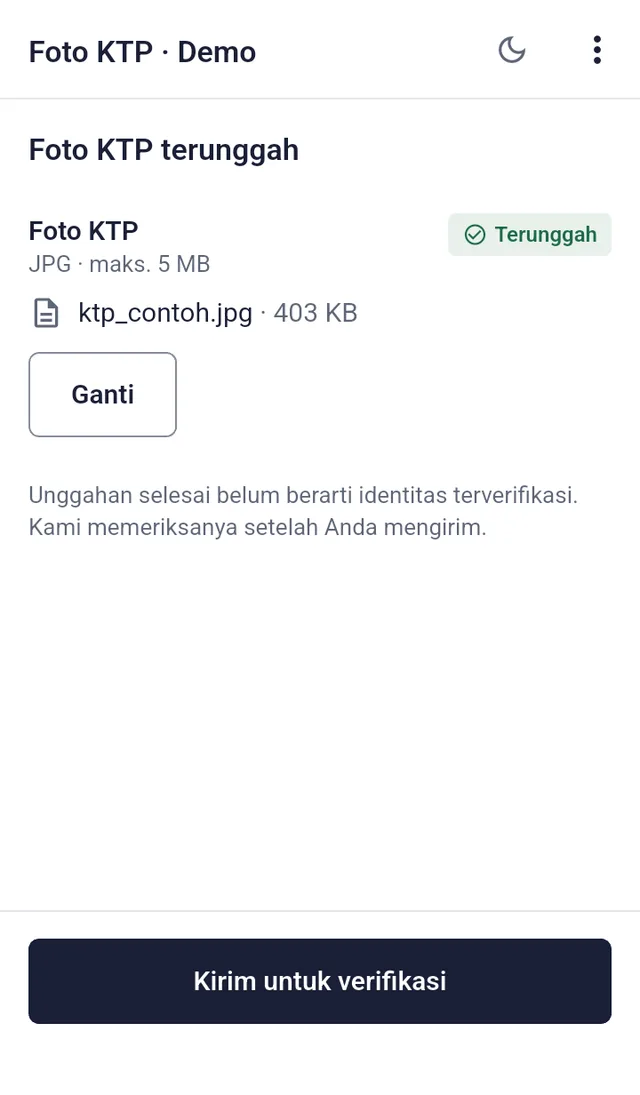
Run and try
Section titled “Run and try”From example/:
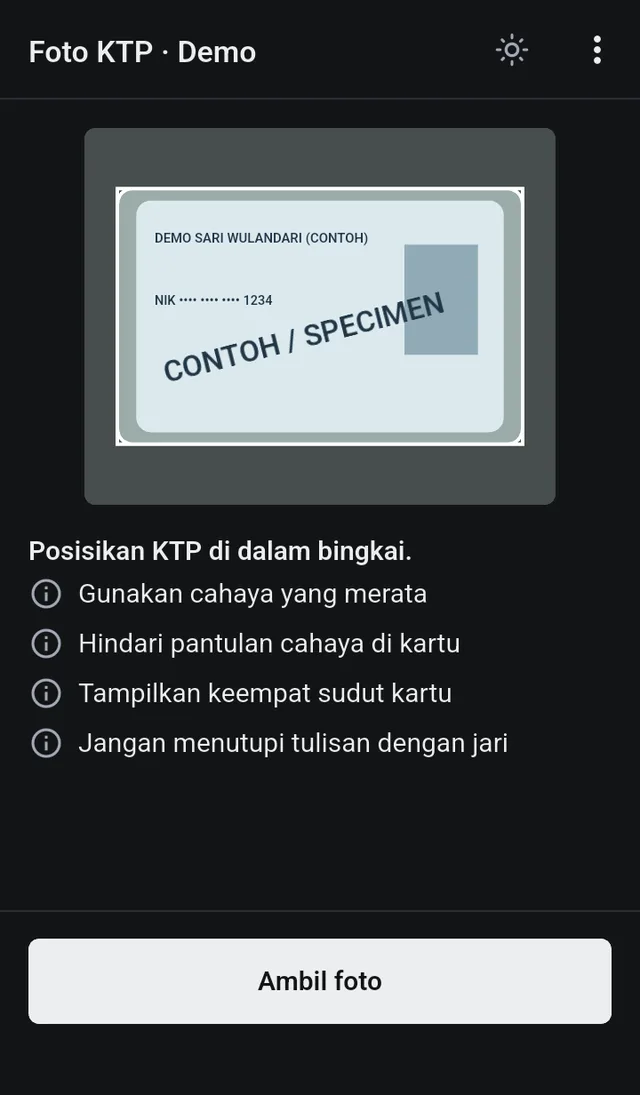
flutter run -d <device-id> -t lib/kyc_capture_demo.dartTap Ambil foto, choose the camera in the source sheet, then Pakai foto. After the upload, tap Kirim untuk verifikasi; the status becomes in review. The developer menu offers Izin kamera ditolak, Foto buram and Unggahan terputus. The camera is synthetic: the demo draws a labelled specimen card and never opens a real camera or gallery.
If the person retakes while an upload is running, the older upload’s answer is ignored because each upload has its own request id. Changing a scenario starts a fresh synthetic session.
Composition and boundaries
Section titled “Composition and boundaries”KycCaptureBlock takes the DocumentSlotState for the photo on screen, the
host’s photo or preview and callbacks. The host keeps the slot keyed by request
id, so a late answer for an earlier photo cannot replace the current one.
| UI | Existing library surface |
|---|---|
| Framing guide, tips, preview and issues | KycCaptureGuide, DocumentSlotState, DocumentIssue |
| Camera or gallery choice (demo host) | showCaptureSourceSheet |
| Uploaded file and replace | DocumentUploadTile |
| In review after submit (demo host) | VerificationStatusView, VerificationSnapshot |
The host owns the camera, picker, permission prompts, settings, image quality checks, upload, retention and the verification verdict. See the KYC capture pattern and the verification pattern. Start with the KYC onboarding block for consent and details.
Source
Section titled “Source”Source: compositions/kyc_capture_block.dart
Open this file on GitHub. Copy and adapt it in your host app.
import 'package:flutter/material.dart';import 'package:rakit_ui/rakit_ui.dart';
/// Copyable host composition: take an ID photo, recover from permission,/// quality and upload problems, then send it for review.////// The host owns the camera, picker, permission prompts, settings and upload./// [slot] is the upload state of the photo on screen, and the host keeps it/// keyed by request id: when the person retakes during an upload, the older/// upload's answer must not replace the new photo's state. A finished upload/// is not a verdict. Only the host's verification status says whether the/// identity is verified.class KycCaptureBlock extends StatelessWidget {  const KycCaptureBlock({    super.key,    required this.requirement,    required this.slot,    required this.onCapture,    required this.onRetake,    required this.onUsePhoto,    required this.onOpenSettings,    required this.onSubmit,    this.photo,    this.preview,    this.submitting = false,  });
  final DocumentRequirement requirement;
  /// Upload state for the photo on screen; empty before the person uses it.  final DocumentSlotState slot;
  /// The host's synthetic or real photo; null while framing.  final ImageProvider? photo;
  /// Live camera preview from the host, shown while framing.  final Widget? preview;  final VoidCallback onCapture;  final VoidCallback onRetake;
  /// Starts or retries the upload of the photo on screen.  final VoidCallback onUsePhoto;  final VoidCallback onOpenSettings;
  /// Sends the uploaded document for verification.  final Future<void> Function() onSubmit;  final bool submitting;
  @override  Widget build(BuildContext context) {    final theme = PaymentTheme.of(context);    final type = PaymentType.of(context);    if (slot.phase != DocumentSlotPhase.uploaded) {      return KycCaptureGuide(        kind: CaptureKind.idCard,        aspectRatio: 1.25,        requirement: requirement,        state: slot,        photo: photo,        preview: preview,        // Block bodies: a host sheet or camera Future must not keep the        // button busy behind the sheet it opened.        onCapture: () {          onCapture();        },        onRetake: onRetake,        onUsePhoto: onUsePhoto,        onOpenSettings: () {          onOpenSettings();        },      );    }    return PaymentFullPageView(      title: 'Foto KTP terunggah',      primaryAction: PaymentButton(        label: 'Kirim untuk verifikasi',        busy: submitting,        busyLabel: 'Mengirim…',        onPressed: onSubmit,      ),      child: Column(        crossAxisAlignment: CrossAxisAlignment.stretch,        spacing: theme.space(PaymentSpace.group),        children: [          DocumentUploadTile(            requirement: requirement,            state: slot,            onPick: submitting ? null : onRetake,          ),          Text(            'Unggahan selesai belum berarti identitas terverifikasi. '            'Kami memeriksanya setelah Anda mengirim.',            style: type.caption,          ),        ],      ),    );  }}
Source: kyc_capture_demo.dart
Open this file on GitHub. Copy and adapt it in your host app.
import 'package:flutter/material.dart';import 'package:rakit_ui/rakit_ui.dart';
import 'adapters/synthetic_capture.dart';import 'block_demo_shell.dart';import 'compositions/kyc_capture_block.dart';
void main() => runBlockDemo(const KycCaptureDemo());
enum KycCaptureScenario { normal, permissionDenied, blurry, interrupted }
const kycCaptureRequirement = DocumentRequirement(  key: 'idCard',  label: 'Foto KTP',  acceptedTypes: {'image/jpeg'},  acceptedTypesLabel: 'JPG',  maxBytes: 5 * 1024 * 1024,);
/// Metadata only: the demo photo is drawn on the device and never leaves it.const kycCaptureFile = DocumentFile(  name: 'ktp_contoh.jpg',  mimeType: 'image/jpeg',  sizeBytes: 412000,);
/// The host's upload answer for one request: null when stored.typedef KycUpload = Future<DocumentIssue?> Function(String requestId);
/// Synthetic capture host. The camera is a drawn specimen, permission and/// upload answers are declared fixtures, and settings never open. Nothing/// leaves the device and nothing is verified.class KycCaptureDemo extends StatefulWidget {  const KycCaptureDemo({    super.key,    this.initialScenario = KycCaptureScenario.normal,    this.initialDark = false,    this.delay = const Duration(milliseconds: 700),    this.takePhoto,    this.upload,  });  final KycCaptureScenario initialScenario;  final bool initialDark;  final Duration delay;
  /// Test hooks standing in for the camera and the upload service.  final Future<ImageProvider> Function()? takePhoto;  final KycUpload? upload;
  @override  State<KycCaptureDemo> createState() => _KycCaptureDemoState();}
class _KycCaptureDemoState extends State<KycCaptureDemo> {  late bool dark = widget.initialDark;  late KycCaptureScenario scenario = widget.initialScenario;  ImageProvider? photo;  DocumentSlotState slot = const DocumentSlotState.empty();  bool cameraAllowed = false;  bool submitting = false;  VerificationSnapshot? verification;  int uploads = 0;  int captures = 0;  int generation = 0;
  void reset(KycCaptureScenario value) => setState(() {    generation++;    scenario = value;    photo = null;    slot = const DocumentSlotState.empty();    cameraAllowed = false;    submitting = false;    verification = null;    uploads = 0;    captures = 0;  });
  Future<void> capture(BuildContext context) async {    if (scenario == KycCaptureScenario.permissionDenied && !cameraAllowed) {      setState(() {        slot = const DocumentSlotState.failed(          DocumentIssue(            DocumentIssueKind.permissionDenied,            safeMessage:                'Izinkan kamera agar Anda dapat memotret KTP, atau pilih foto '                'dari galeri.',            canOpenSettings: true,          ),        );      });      return;    }    final current = generation;    final source = await showCaptureSourceSheet(      context: context,      sources: const {CaptureSource.camera, CaptureSource.gallery},    );    if (source == null || !mounted || current != generation) return;    final image = await (widget.takePhoto ?? _drawPhoto)();    if (!mounted || current != generation) return;    setState(() {      photo = image;      slot = const DocumentSlotState.empty();    });  }
  Future<ImageProvider> _drawPhoto() => renderSyntheticPhoto(    CaptureKind.idCard,    // The blurry scenario draws its first photo out of focus, so the host's    // quality answer matches what the person sees.    blurry: scenario == KycCaptureScenario.blurry && captures++ == 0,  );
  Future<DocumentIssue?> _upload(String requestId) async {    final first = uploads == 1;    await Future<void>.delayed(widget.delay);    return switch (scenario) {      KycCaptureScenario.blurry when first => const DocumentIssue(        DocumentIssueKind.rejectedByHost,        safeMessage:            'Foto buram sehingga teks KTP tidak terbaca. Foto ulang di tempat '            'terang.',      ),      KycCaptureScenario.interrupted when first => const DocumentIssue(        DocumentIssueKind.uploadInterrupted,        safeMessage: 'Koneksi terputus. Foto Anda masih di sini.',      ),      _ => null,    };  }
  Future<void> usePhoto() async {    if (photo == null || slot.phase == DocumentSlotPhase.uploading) return;    final current = generation;    final requestId = 'UPLOAD-DEMO-${++uploads}';    setState(() {      slot = DocumentSlotState.uploading(kycCaptureFile, requestId: requestId);    });    final issue = await (widget.upload ?? _upload)(requestId);    // An answer for an earlier photo or session never replaces the current    // photo's state.    if (!mounted || current != generation || slot.requestId != requestId) {      return;    }    setState(() {      slot = issue == null          ? DocumentSlotState.uploaded(kycCaptureFile, requestId: requestId)          : DocumentSlotState.failed(              issue,              file: kycCaptureFile,              requestId: requestId,            );    });  }
  void retake() => setState(() {    photo = null;    slot = const DocumentSlotState.empty();  });
  void openSettings(BuildContext context) => showPaymentSheet<void>(    context: context,    builder: (sheet) => PaymentSheet(      header: PaymentSheetHeader(        title: 'Pengaturan kamera · Demo',        onClose: () => Navigator.pop(sheet),      ),      body: const Text(        'Demo ini tidak membuka pengaturan perangkat. Aplikasi Anda membuka '        'pengaturan izin, lalu memeriksa izin lagi saat Anda kembali.',      ),      footer: PaymentButton(        label: 'Simulasikan izin kamera',        variant: PaymentButtonVariant.secondary,        onPressed: () {          // Declared synthetic answer: the person allowed the camera.          setState(() {            cameraAllowed = true;            slot = const DocumentSlotState.empty();          });          Navigator.pop(sheet);        },      ),    ),  );
  Future<void> submit() async {    if (submitting) return;    final current = generation;    setState(() => submitting = true);    await Future<void>.delayed(widget.delay);    if (!mounted || current != generation) return;    setState(() {      submitting = false;      // The host's verification answer, separate from the upload.      verification = VerificationSnapshot(        status: VerificationStatus.inReview,        requestId: 'KYC-DEMO-221',        updatedAt: DateTime(2026, 11, 4, 10, 30),        allowedActions: const {VerificationAction.checkStatus},      );    });  }
  @override  Widget build(BuildContext context) => BlockDemoShell(    title: 'Foto KTP · Demo',    dark: dark,    onToggleDark: () => setState(() => dark = !dark),    scenarios: [      for (final (value, label) in [        (KycCaptureScenario.normal, 'Foto diterima'),        (KycCaptureScenario.permissionDenied, 'Izin kamera ditolak'),        (KycCaptureScenario.blurry, 'Foto buram'),        (KycCaptureScenario.interrupted, 'Unggahan terputus'),      ])        (label: label, onSelected: () => reset(value)),    ],    body: (context) => verification != null        ? VerificationStatusView(            key: ValueKey('status-$generation'),            snapshot: verification!,            // Checking again returns the same in-review answer in this demo.            onAction: (_) {},          )        : KycCaptureBlock(            key: ValueKey(generation),            requirement: kycCaptureRequirement,            slot: slot,            photo: photo,            preview: const SyntheticCameraPreview(kind: CaptureKind.idCard),            submitting: submitting,            onCapture: () => capture(context),            onRetake: retake,            onUsePhoto: usePhoto,            onOpenSettings: () => openSettings(context),            onSubmit: submit,          ),  );}
Source: block_demo_shell.dart
Open this file on GitHub. Copy and adapt it in your host app.
import 'package:flutter/material.dart';import 'package:flutter/services.dart';import 'package:flutter_localizations/flutter_localizations.dart';import 'package:rakit_ui/rakit_ui.dart';
import 'themes.dart';
/// Starts a block demo edge-to-edge, as the shipped checkout demo does.void runBlockDemo(Widget app) {  WidgetsFlutterBinding.ensureInitialized();  SystemChrome.setEnabledSystemUIMode(SystemUiMode.edgeToEdge);  runApp(app);}
/// The example host's clipboard effect. It reports the real outcome and never/// claims a copy that did not happen. The kit itself never touches the/// clipboard (B11).Future<bool> copyToClipboard(String value) async {  try {    await Clipboard.setData(ClipboardData(text: value));    return true;  } on PlatformException {    return false;  }}
/// One developer scenario in the demo menu. Choosing it restarts the/// synthetic session; it is never an end-user action.typedef DemoScenario = ({String label, VoidCallback onSelected});
/// Ordinary phone host chrome shared by the block demos: app themes, Indonesian/// localization, D85 system-bar styling, a light/dark switch and a developer/// scenario menu. It is example scaffolding, not a block runtime: copy the/// composition under `compositions/` and keep your own app shell.class BlockDemoShell extends StatelessWidget {  const BlockDemoShell({    super.key,    required this.title,    required this.dark,    required this.onToggleDark,    required this.body,    this.scenarios = const [],    this.lightTheme,    this.darkTheme,    this.locale = const Locale('id'),    this.textScale,  });
  final String title;  final bool dark;  final VoidCallback onToggleDark;  final List<DemoScenario> scenarios;
  /// Optional illustrative host themes; the payment demos use Ruang Bayar.  final ThemeData? lightTheme;  final ThemeData? darkTheme;
  /// Host locale for this synthetic demo.  final Locale locale;
  /// Optional fixed text scale for accessibility captures; null follows the  /// device setting.  final double? textScale;
  /// Built below the Scaffold, so sheets and toasts find their ancestors.  final WidgetBuilder body;
  @override  Widget build(BuildContext context) => MaterialApp(    debugShowCheckedModeBanner: false,    theme: lightTheme ?? buildTheme(DemoBrand.ruangBayar, Brightness.light),    darkTheme: darkTheme ?? buildTheme(DemoBrand.ruangBayar, Brightness.dark),    themeMode: dark ? ThemeMode.dark : ThemeMode.light,    locale: locale,    supportedLocales: const [Locale('id'), Locale('en')],    localizationsDelegates: const [      PaymentLocalizations.delegate,      GlobalMaterialLocalizations.delegate,      GlobalWidgetsLocalizations.delegate,      GlobalCupertinoLocalizations.delegate,    ],    builder: (context, child) {      final scale = textScale;      if (scale == null) return child!;      return MediaQuery(        data: MediaQuery.of(          context,        ).copyWith(textScaler: TextScaler.linear(scale)),        child: child!,      );    },    home: AnnotatedRegion<SystemUiOverlayStyle>(      // D85: the host styles the system bars from its resolved theme.      value: (dark ? SystemUiOverlayStyle.light : SystemUiOverlayStyle.dark)          .copyWith(            systemNavigationBarColor: Colors.transparent,            systemNavigationBarDividerColor: Colors.transparent,            systemNavigationBarContrastEnforced: false,          ),      child: Scaffold(        appBar: AppBar(          title: Text(title),          actions: [            PaymentIconButton(              icon: dark ? Icons.light_mode_outlined : Icons.dark_mode_outlined,              tooltip: dark ? 'Mode terang' : 'Mode gelap',              onPressed: onToggleDark,            ),            if (scenarios.isNotEmpty)              PopupMenuButton<int>(                tooltip: 'Skenario demo',                onSelected: (i) => scenarios[i].onSelected(),                itemBuilder: (_) => [                  for (final (i, s) in scenarios.indexed)                    PopupMenuItem(value: i, child: Text(s.label)),                ],              ),          ],        ),        body: SafeArea(top: false, child: Builder(builder: body)),      ),    ),  );}
Proof and limits
Section titled “Proof and limits”Widget tests cover retake with an upload still running, permission denial, upload retry and a reachable capture action at 320 dp with 200% text. The demo uses a synthetic camera; connect your own camera, upload and verification services. See Compatibility for device coverage.